多线程篇七
定时器
什么是定时器
听到定时器,首先想到的是“闹钟”.到一个设置好的时间之后就执行某个指定好的代码.(在实际开发中非常常用,如网络通信【邮件发送】)
你在抢演唱会门票,已经到了支付页面,但是网突然崩了,页面显示让你等待,这下怎么办!!对于我们来说是不能无限的等待下去的,我们需要一个等待期限最好是尽快处理,此处的等待时间就通过定时器来实现了.
标准库中的定时器
标准库中提供了一个Timer类.其核心方法为schedule.(注意不要自命名Timer类)
schedule 包含两个参数. 第一个参数指定即将要执行的任务代码, 第二个参数指定多长时间之后 执行 (单位为毫秒).
上代码!
1
2
3
4
5
6
7
8
9
10
11
12
13
14
15
16
| import java.util.Timer;
import java.util.TimerTask;
public class TimeKeeper {
public static void main(String[] args) {
Timer timer = new Timer();
timer.schedule(new TimerTask() {
@Override
public void run() {
System.out.println("Hello Keeper!");
}
},5000);
System.out.println("Hello Main!");
}
}
|
运行代码

发现先打印了”Hello Keeper!”等待五秒后打印’’Hellp Main”,Why?
可以通过代码观察到主线程执行schedule方法的时候讲Task放到timer对象中,timer中也包含一个线程(“扫描线程”,等待的时间到了就会执行安排给扫描线程的任务)
那怎么线程没有结束呢?上源码!

Timer内部还有线程!
一个Timer中是可以安排多个任务的
定时器的实现
1
2
3
4
5
6
7
8
9
10
11
12
13
14
15
16
17
18
19
20
21
22
23
24
25
26
27
28
29
30
31
32
33
34
35
36
37
38
39
40
41
42
43
44
45
46
47
48
49
50
51
52
53
54
55
56
57
58
59
60
61
62
63
64
65
66
67
68
69
70
71
72
73
74
75
76
77
78
79
80
81
82
83
84
85
86
87
88
89
90
91
92
93
94
95
96
97
98
99
100
101
102
103
| import java.util.PriorityQueue;
class MyTimerTask implements Comparable<MyTimerTask> {
private Runnable runnable;
private long time;
public MyTimerTask(Runnable runnable,long delay) {
this.runnable = runnable;
this.time = System.currentTimeMillis() + delay;
}
@Override
public int compareTo(MyTimerTask o) {
return (int)(this.time - o.time);
}
public long getTime() {
return time;
}
public Runnable getRunnable() {
return runnable;
}
}
class MyTimer {
private PriorityQueue<MyTimerTask> queue = new PriorityQueue<MyTimerTask>();
private Object locker = new Object();
public void schedule(Runnable runnable, long delay) {
synchronized(locker) {
queue.offer(new MyTimerTask(runnable, delay));
locker.notify();
}
}
public MyTimer() {
Thread t = new Thread(() -> {
while(true) {
try {
synchronized(locker) {
while(queue.isEmpty()) {
locker.wait();
}
MyTimerTask task = queue.peek();
long curTime = System.currentTimeMillis();
if(curTime >= task.getTime()) {
task.getRunnable().run();
queue.poll();
}else {
locker.wait(task.getTime() - curTime);
}
}
}catch (InterruptedException e) {
throw new RuntimeException(e);
}
}
});
t.start();
}
}
public class TimeKeeper {
public static void main(String[] args) {
MyTimer timer = new MyTimer();
timer.schedule(new Runnable() {
@Override
public void run() {
System.out.println("5000");
}
},5000);
timer.schedule(new Runnable() {
@Override
public void run() {
System.out.println("4000");
}
},4000);
timer.schedule(new Runnable() {
@Override
public void run() {
System.out.println("3000");
}
},3000);
System.out.println("Game Start!");
}
}
|
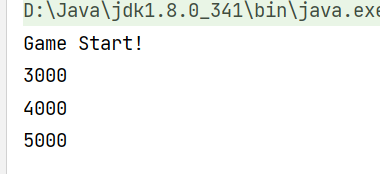
运行得到
思路分析
1.Timer中需要有一个线程扫描任务是否到时间,是否执行,
2.需要一个数据结构,把所有的任务都保存起来
3.需要创建一个类通过类的对象描述一个任务(至少包含任务和时间)
相比ArrayList使用优先级队列更好【优先级队列时间复杂度可以达到O(1)】
咱都知道ArrayList(数组)遍历时会对每一个任务都进行遍历并且可能会有很多趟,这不是妥妥的资源浪费.而使用优先级队列可以给Timer中的任务“赋值”,最先执行时间最小的任务,其他任务就不能执行了.
Question
1.”调试器”怎么使用?
靠谱一点的是打印日志【println】,避免打断点对线程正常工作的影响.
2.为什么使用wait不使用sleep?【避免忙等 消耗资源】
使用wait比sleep更好.主线程调用schedule添加新任务但还在等待过程,新的任务执行时间比最早的任务时间还早刚好可以使用schedule中的notify唤醒wait让循环再执行一遍